
FeedWatch Premix Parser
Upload your FeedWatch recipes and ingredient usage reports to generate an Excel for UpLook.
1
Ingredient Usage Report CSV
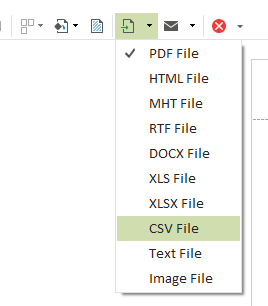
In FeedWatch, open the User Reports section. Find your previously created Elanco Ingredient Usage milk report. Set the date range you need and run it. When the preview opens, click the arrow next to the Export Document button in the menu bar and choose CSV.
2
Recipes CSV
In FeedWatch, open the Recipes section. Find and click the Print Recipes button in the menu bar. When the preview of all recipes opens, click the arrow next to the Export Document button and choose CSV.

3
Output Options
Confirm column mapping and upload recipes to enable export
Status
Ingredient Usage CSVNot uploaded
Recipes CSVNot uploaded